

Check and repair your STL file
Detect open edges, non-manifold geometry and printability issues before ordering.
repair STL file: Fix errors & make printable (non-manifold, holes, normals)
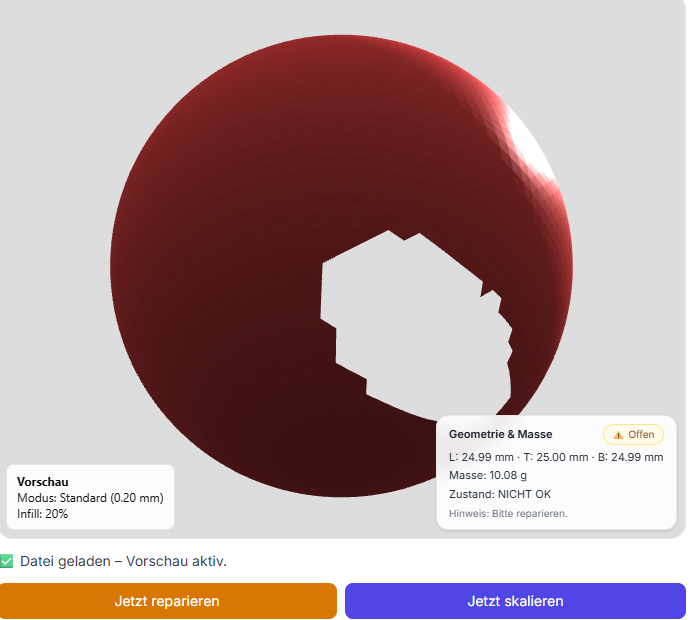
A STL file is the basis for every 3D print. Nevertheless, many files are nicht directly druckfähig - even if they look "okay" in the preview. The result: printabbrüche, rough surfaces, Holesmissing surfaces or unstable components.
➡️ The solution: repair STL file and optimize before printing. In this article, I'll show you the most common mistakes in the repair process and when this is particularly worthwhile.
Why STL-error im 3D printing so häufig sind
Many STL files are not created "cleanly" from a perfect CAD model, but from different sources - and this is where most problems arise. STL errors are particularly common in:
- Exports from CAD programs (too coarse resolution, unfavorable tessellation, export errors)
- 3D-Scans (Holes, noise, incomplete surfaces)
- Online generators or Konvertern (Non-Manifold, doppelte Flächen)
- older or third-party STL files (unknown quality, faulty meshes)
Important: A model can "look good" in the preview and still be faulty. The slicer or the print often only reveals the problem later - and then it costs time, material and nerves.
Common errors in STL files
Many Google searches revolve around exactly these problems: "STL not watertight", "Non-Manifold STL", "Repair mesh", "STL Close holes" or „STL error im Slicer“.
| errorbild | What es bedeutet | Typische Folgen im print |
|---|---|---|
| Open areas / not watertight | Das model ist nicht geschlossen, volume ist nicht eindeutig. | Missing walls, holes, wrong filling, demolitions. |
| Non-Manifold | Kanten/Flächen sind topologisch „unmöglich“ (z.B. Fläche teilt eine Kante morefach). | Slicer warnings, broken layers, weird internal structures. |
| Inverted normals | Flächen zeigen nach inner statt außen (or gemischt). | Missing outer skin, wrong shells, holes. |
| Duplicate / overlapping geometries | Zwei Körper liegen übereinander or schneiden sich unclean. | Unruhige Oberfläche, Artefakte, unnötig lange printzeit. |
| Wall thicknesses too thin | Wände sind smaller als Düsengröße / Prozessgrenze. | Instabil, bricht, wed vom Slicer „wegoptimiert“. |
| errorhaftes Mesh | Broken triangles, holes, missing facets. | Oberflächenfehler, nicht druckbar or schlechte Qualität. |
repair STL file - how it works
1️⃣ Analyse der STL file
The first step is to check:
- Ist das model closed (watertight)?
- Is there open edges or Löcher?
- Are the Normal correctly aligned?
- Gibt es Notee auf Non-Manifold or Doppelgeometrie?
- Are Wall thicknesses useful for 3D printing?
2️⃣ error beheben & Geometrie korrigieren
Depending on the error pattern:
- Holes closed and fehlende Flächen ergänzt
- Normal corrected (inner/außen richtig definieren)
- Non-Manifold Cleaned edges/surfaces
- Double/overlapping geometries removed
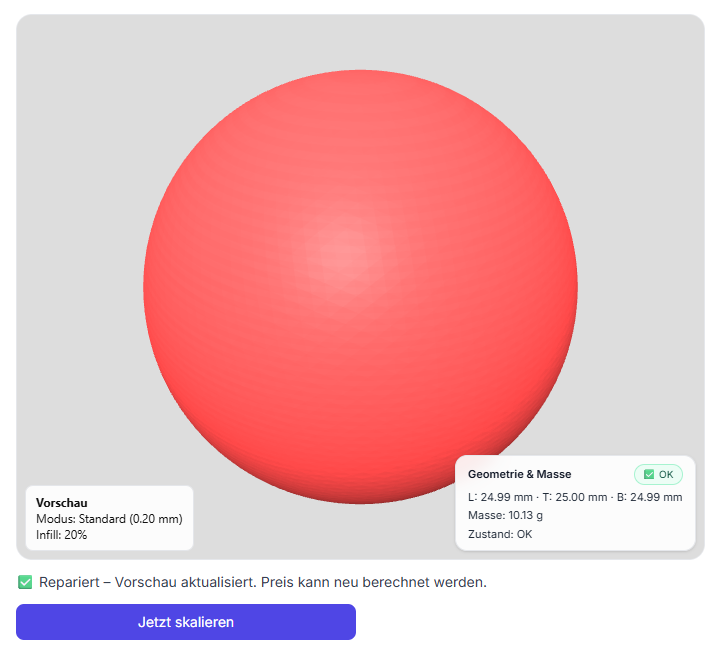
- Mesh-Struktur stabilisiert (cleane, druckbare Oberfläche)
➡️ Goal: a 100% druckfähige STL-Datei.
3️⃣ Optimierung für den 3D printing
In addition, the file is prepared so that it works reliably in print:
- Optimization depending on Material (PLA / PETG / ASA ...)
- Check for Stability (critical places / thin areas)
- Check the Dimensional accuracy für fits
- Optional: Geometrie versimpleen (less Artefakte, bessere printzeit)
When is worthwhile eine STL-Reparatur besonders?
- ✔ Der print bricht always in the same place from
- ✔ The slicer shows Warnungen or error (non-manifold / open edges)
- ✔ The interface is restless, hat Löcher or beschädigte Bereiche
- ✔ Die file stammt aus Scan or Download
- ✔ On Dimension part should be manufactured precisely (fit is important)
In these cases, repairs almost always save Time, Material and costs - because misprints and "try & error" are eliminated.
Deine Vorteile bei BuildYour3D
- ✔ repair STL files professionally (offen / nicht watertight / Mesh-error)
- ✔ Erfahrung with problematischen modelen (CAD-Export, Scan, Download)
- ✔ Optimierung directly für den 3D printing (stable & printable)
- ✔ Support also without CAD skills
- ✔ Combination of Datenaufreadyung & printservice
FAQ - Repair STL files
Can any STL file be repaired?
Most yes. Even badly damaged files can often be saved - depending on the error pattern by Closing holes, correcting normals and cleaning up non-manifold geometry.
Do I have to do this myself?
No. You can simply upload the file - we will analyze and repair it.
Is the file immediately printable afterwards?
Yes, the goal is always a print-ready STL file. After the repair, the model is checked again, so that the mesh is closed and clean.
Also wanted
STL repair file, STL repair, STL fix, STL not watertight, STL not watertight, Mesh repair, non manifold STL, close holes STL, open surfaces STL, inverted normals, STL error slicer, 3D model repair, printable STL, STL repair service, 3D printing service Germany.
Conclusion: STL repair saves frustration, time & money
A faulty STL file is one of the most common reasons for poor printing results. If you have STL files repaired, you reduce misprints and get reliable, printable data.
Check and repair your STL file
Detect open edges, non-manifold geometry and printability issues before ordering.