


Home & organization STL guides ·
Track slider for panel curtain carriers STL: Create a Custom-Size 3D Model
Create a custom-size track slider for panel curtain carriers STL for your own 3D printer. Check the model controls, measure the fit and buy the generated digital file.
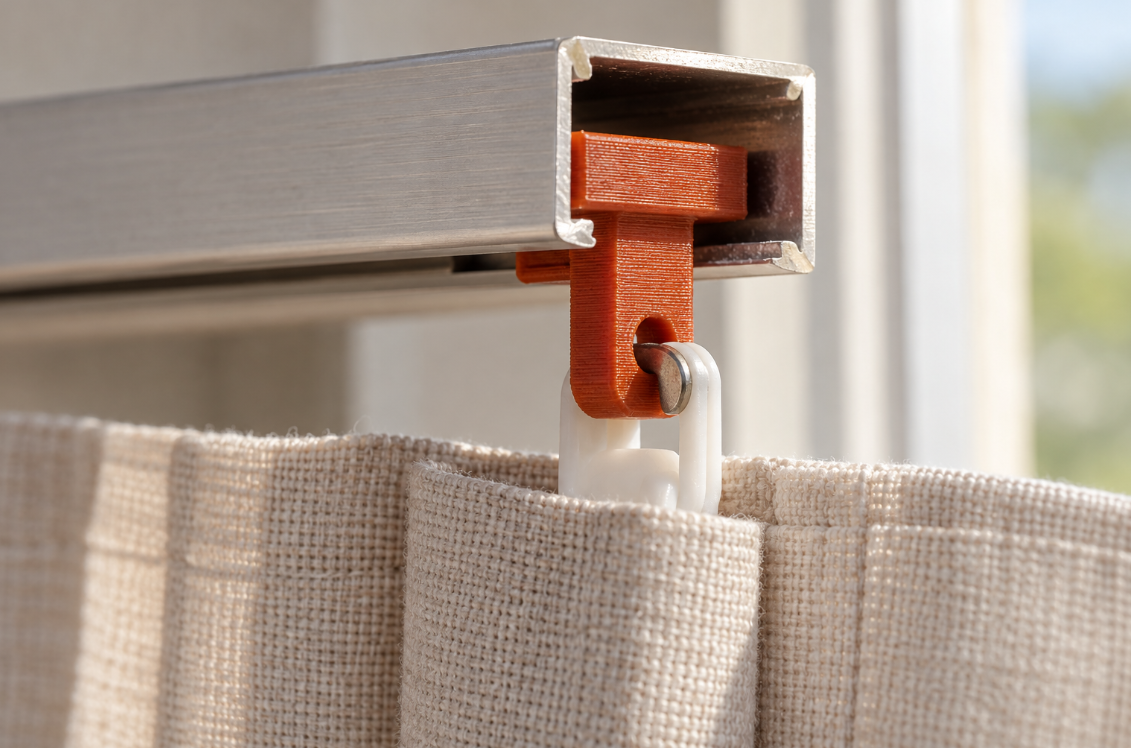
Replace a broken slider on a lightweight panel curtain. Match head, neck and connecting tab to the rail and existing carrier. Dimensions and fit: Measure internal rail width and height and the lower slot. Head thickness is 3 mm, neck length 4 mm and tab thickness 3.2 mm. Provide tested sliding clearance and check that the 8 mm wide tab matches the carrier.
With the Custom track slider for panel curtain carriers template, you can turn those measurements into a custom-size STL. Review controls such as slider head width, slider head length, neck width in rail slot, check your model in the preview and choose the digital file. You buy the generated STL and print it on your own 3D printer, using your preferred filament and slicer settings.
Measurements for your track slider for panel curtain carriers STL
The product page exposes the following useful geometry controls. Work from your measured parts and check the displayed units and the preview before entering final values.
| Model control | What to check |
|---|---|
| Slider head width | Measure across the named feature and allow space for the neighbouring parts. |
| Slider head length | Check both endpoints of the named feature, including its working reach or engagement. |
| Neck width in rail slot | Measure across the named feature and allow space for the neighbouring parts. |
| Connecting tab length | Check both endpoints of the named feature, including its working reach or engagement. |
| Connection bore | Measure the mating shaft or fastener and decide what type of fit the opening needs. |
Check the mating mechanism before choosing an STL
A mechanism can look right in a picture and still fail to mesh or align. Keep the mating geometry, shaft connection and available axial space together in your notes. Changing a gear or drive component by uniform scaling also changes dimensions that may already be correct. Use the actual model controls and inspect a slow, unpowered trial assembly before considering a working mechanism.
Fit and parts supplied separately
Light curtains; no certified load rating. Check rail height and end stops, support the panel during trials. Not an X-turn locking fitting. Additional items: Retained metal pin or suitable fastener, existing panel carrier.
Configure the model, buy the STL and print locally
- Open the track slider for panel curtain carriers product page and compare the model preview with your application.
- Enter the relevant measurements. Use the units displayed beside each input; convert inch measurements before using a millimetre field.
- Review the complete geometry and keep a record of your parameter values. Check small openings, mating features and remaining wall thickness.
- Choose the digital STL purchase option and review the current price and order details before payment.
- After receiving the STL, open it in your slicer, confirm the imported dimensions and inspect the layer preview before printing.
Configure my track slider for panel curtain carriers STL
Trial-fit the printed geometry
Print, smooth edges and check working dimensions. Feed the head through an accessible rail end and connect the tab to the existing carrier using a retained metal pin. Try on a sample first without forcing.
Before you choose your STL
Why configure the model instead of scaling a download?
Uniform scaling changes all dimensions together. Here you can work with the available controls, including slider head width, slider head length, neck width in rail slot, and check the result before purchase. Keep your input values for later revisions: the downloaded STL contains the final mesh, rather than the original parametric editing history.
What do I buy?
Select the digital STL option for the file you will print yourself. Review the current price and selected configuration before paying. Ordering a finished print is a separate option.
Make the next print fit your project
Have your measurements ready? Open the track slider for panel curtain carriers template, adjust the model and inspect the preview. When the geometry matches what you need, choose your STL and take it to your own printer.
Next step