

Crafts & design STL guides ·
Personalized Stamp STL: Create a 3D Model with Your Text
Create a personalized stamp STL with your own text. Check the lettering and stamping face, then buy the digital file for your 3D printer.
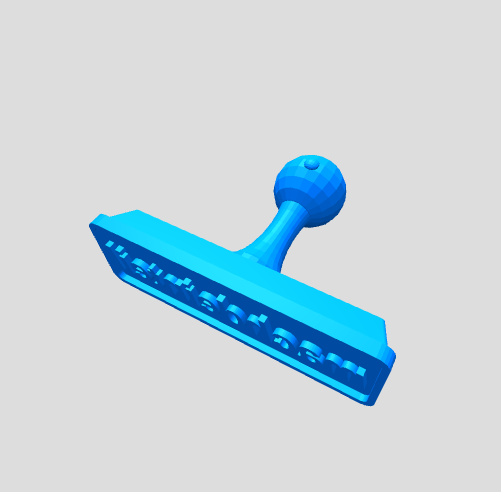
For a text stamp, the orientation of the lettering matters as much as its spelling. Inspect the actual stamping face in the preview and confirm how its impression should read. The visible product parameter list identifies text; do not assume additional handle or font controls are available.
With the Stamp template, you can turn your text into a personalized STL. Review controls such as text, check your model in the preview and choose the digital file. You buy the generated STL and print it on your own 3D printer, using your preferred filament and slicer settings.
Text and preview checks for your stamp STL
The product page lists the following personalization input. Check your wording and the generated stamping face before choosing the digital file.
| Model control | What to check |
|---|---|
| Text | Review spelling, legibility and the smallest details at the intended printed size. |
Check readability at the size you will print
Review the spelling and arrangement before paying for the generated file. Thin letter strokes, small gaps and attachment features need to remain visible at the intended physical size. Enlarging a preview on screen can conceal details that will be tiny on the print.
Configure the model, buy the STL and print locally
- Open the stamp product page and compare the model preview with your application.
- Enter your text and check the spelling, arrangement and orientation of the stamping face in the preview.
- Review the complete geometry and keep a record of your parameter values. Check small openings, mating features and remaining wall thickness.
- Choose the digital STL purchase option and review the current price and order details before payment.
- After receiving the STL, open it in your slicer, confirm the imported dimensions and inspect the layer preview before printing.
Check a first print before making more
A CAD dimension and a printed dimension can differ. Print a fit sample or one prototype before making a batch, and check the features that contact other parts. Choose print orientation, supports and material for the actual geometry and application. There is no universal clearance or print profile that guarantees the fit on every machine.
Before you choose your STL
Why configure the model instead of scaling a download?
Uniform scaling changes all dimensions together. Here you can work with the available controls, including text, and check the result before purchase. Keep your input values for later revisions: the downloaded STL contains the final mesh, rather than the original parametric editing history.
What do I buy?
Select the digital STL option for the file you will print yourself. Review the current price and selected configuration before paying. Ordering a finished print is a separate option.
Make the next print fit your project
Have your text ready? Open the stamp template, adjust the model and inspect the preview. When the geometry matches what you need, choose your STL and take it to your own printer.
Next step