

Wall Mounts ·
No Mount for the SpeaKa SP-WTR-400? Configure a Custom Wall Mount
A real-world custom wall mount for the SpeaKa Professional SP-WTR-400, configured online to exact dimensions and adaptable for tablets, routers, streaming boxes, mini PCs and other electronics.
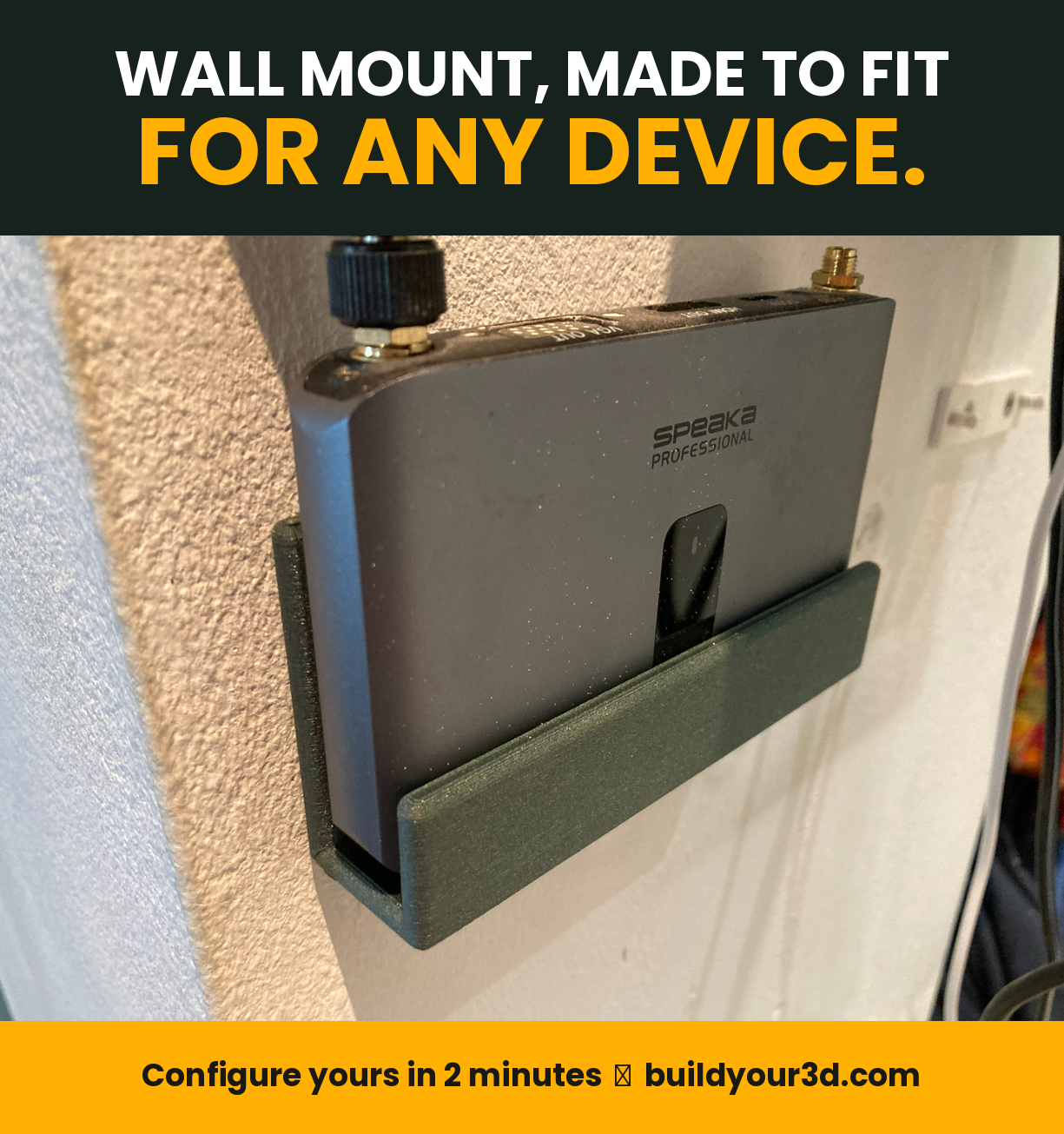
No wall mount available for the SpeaKa Professional SP-WTR-400? Create one to your exact dimensions
For the SpeaKa Professional SP-WTR-400 wireless HDMI receiver, a 30 m, 2.4 GHz wireless HDMI transmission system, it can be difficult to find a purpose-built wall mount. That was exactly the problem in this real-world use case: the receiver needed to be mounted neatly, securely and close to the TV without relying on an oversized universal shelf, adhesive tape or an improvised bracket.
The solution is a parametric U-pocket wall mount that can be configured directly in the browser. Overall length, backplate height, inner pocket width, front retaining lip height and material thickness can all be adjusted. The result is a custom device holder for the SP-WTR-400 and for many other devices such as tablets, routers, streaming boxes, HDMI extenders, mini PCs, smart-home hubs, power supplies, controllers and compact electronics.
The use case: mounting the SpeaKa Professional SP-WTR-400 on a wall
The SpeaKa Professional SP-WTR-400 transmits an HDMI signal wirelessly. Devices of this kind are often installed behind a television, beside a monitor, inside a media cabinet, in a meeting room or as part of a presentation setup. Although the receiver works without a special mounting system, leaving it loose is rarely ideal. HDMI and power cables can pull on the unit, the receiver can slide, fall behind the TV or take up unnecessary shelf space.
A dedicated wireless HDMI receiver wall mount gives the device a fixed location. Power and HDMI cables can be routed more cleanly, the receiver stays accessible and the installation looks more professional. The challenge is that niche electronics such as the SP-WTR-400 often do not have a model-specific bracket available as a standard retail product. Generic mounts may be too large, too loose or may block connectors, ventilation openings or buttons.
With a parametric online configurator, the wall mount is generated from the actual dimensions required. Instead of forcing the device into a fixed-size bracket, the bracket is created to fit the device.
The solution: a parametric U-pocket wall mount configured in the browser
The configurator creates a U-shaped device pocket made from a backplate, a bottom support surface and a front retaining lip. The device is inserted from above or from the side, depending on the installation, and the front edge prevents it from sliding forward. This geometry works especially well for flat rectangular devices that need to sit close to a wall or panel.
No CAD skills are required. The dimensions are entered directly in the browser. From these values, the system creates a custom 3D model matched to the device width, thickness and required retaining height. This makes the configurator useful whenever the manufacturer does not offer a wall bracket or when available universal mounts are too large, too small or unsuitable.
➡ Open the parametric wall mount configurator
Proven settings for the SpeaKa Professional SP-WTR-400
The following dimensions were used for this specific application. They create a long U-pocket that supports the receiver across a large section of its width:
| Parameter | Value | Purpose |
|---|---|---|
| Overall holder length | 180 mm | Horizontal length along the wall and support width for the device. |
| Backplate height | 55 mm | Provides a large contact area and improves stability against the wall. |
| Clear inner width of the U-pocket | 14 mm | Defines the free space between the backplate and the front retaining lip. |
| Front retaining lip height | 14 mm | Prevents the receiver from sliding forward out of the pocket. |
| Material thickness | 5 mm | Adds stiffness, strength and durability to the holder. |
These dimensions are a practical starting point for the described receiver. The real device should still be measured before printing or ordering. Production tolerances, rubber feet, labels, protective films or added pads can affect the required inner width.
How to measure the device correctly
The most important measurement is the device thickness. Measure the receiver at several points, ideally with a digital caliper. Include protruding feet, labels, protective layers or cases. Add a small amount of clearance to the measured thickness.
As a general starting point, 0.5 to 1.5 mm of additional clearance can be useful. A tight fit keeps the device compact but may bind if the print surface is rough or the printer is not perfectly calibrated. A looser fit makes insertion easier but allows more movement. The ideal tolerance depends on the printer, filament, print orientation and the desired fit.
The overall holder length does not always have to equal the full width of the device. A shorter mount may be sufficient if the device is supported centrally and cannot twist or tip. A longer mount distributes the load better and provides more guidance, but should not block side connectors, ventilation slots or controls.
What do the five parameters control?
1. Overall holder length
The overall length defines the horizontal size of the U-pocket along the mounting surface. For the SP-WTR-400, 180 mm was selected. A longer holder supports more of the device and helps prevent twisting. Smaller electronics, power adapters or control boxes may require a much shorter length.
2. Backplate height
The backplate connects the pocket to the mounting surface. A taller backplate provides more contact area and can make the holder stiffer. It can also offer more room for appropriate mounting points, depending on the final design and installation method.
A height of 55 mm gives the SpeaKa receiver a broad support area. A lower backplate may be enough for very flat devices, while tablets, displays or taller electronics boxes may benefit from a larger value.
3. Clear inner width of the U-pocket
The clear inner width is the key fit dimension. It is the free distance between the backplate and the front retaining lip. At 14 mm, the pocket can accept a device of suitable thickness with a small amount of clearance.
This value should not be confused with the outside depth of the holder. Material thickness is added outside the clear internal space. Always measure the real device instead of relying only on a nominal manufacturer specification.
4. Front retaining lip height
The front retaining lip keeps the device from sliding out. At 14 mm, the receiver remains securely seated without covering an unnecessarily large part of the enclosure. For a tablet or display, check whether the lip would overlap the visible screen area. The safest approach is to make the lip only as high as necessary.
5. Material thickness
Material thickness affects stiffness, strength, print time and material usage. The chosen 5 mm provides a robust indoor configuration for this use case. Thinner walls save material but may flex more over a long span. Thicker walls increase rigidity but also require more space and printing time.
Load capacity depends on more than wall thickness. Filament type, layer orientation, perimeter count, infill, screws, anchors, wall material, temperature and lever forces all matter.
Why a custom wall mount can be better than a generic universal bracket
Many universal brackets are designed to be oversized so that they can hold many different devices. This often results in excessive play, visible straps, protruding parts or blocked connectors. A parametric wall mount follows the opposite approach: the geometry is generated from the dimensions actually required.
- The inner width can match the real device thickness.
- The support length can be adapted to the device.
- The front lip can be only as high as necessary.
- The mount uses the available space efficiently.
- Rare, discontinued and niche devices can still be mounted.
- A new holder can be generated when the device changes.
More than a SpeaKa mount: typical devices and use cases
The U-pocket is not limited to the SP-WTR-400. It can be adapted for many rectangular or nearly rectangular objects. The essential requirements are suitable dimensions, adequate strength and a safe mounting method.
TV, video and home entertainment electronics
Possible applications include HDMI receivers, HDMI transmitters, HDMI extenders, wireless HDMI kits, AV accessories, streaming boxes, TV boxes, IPTV receivers, media players, HDMI splitters, HDMI switches, capture devices, signal converters, scalers, compact set-top boxes and remote-control hubs.
Relevant searches include HDMI receiver wall mount, wireless HDMI receiver holder, streaming box wall mount, TV box wall bracket, mount receiver behind TV and HDMI extender holder.
Tablet and smartphone wall mounts
Because the length, inner width and retaining lip are adjustable, the same design can also serve as a simple tablet wall mount. Possible devices include Apple iPad, iPad mini, iPad Air, Samsung Galaxy Tab, Lenovo Tab, Amazon Fire Tablet, Microsoft Surface Go and other flat displays. A compact version may also work as a phone wall holder or charging-station cradle.
For tablets, consider the screen bezel, buttons, speakers, cameras and charging connector. Public kiosk installations or theft-resistant mounts usually need additional security features.
Router, modem and networking equipment mounts
Flat routers, modems, compact Ethernet switches, access points, Wi-Fi repeaters, fiber modems, media converters, PoE injectors and network adapters can be mounted on a wall, under a desk or inside a technical cabinet. Common searches include router wall mount, modem holder, network switch wall mount, access point bracket and wall mount for networking equipment.
Do not cover ventilation openings. Heat buildup and cable access should be checked before installation.
Mini PC, Raspberry Pi and smart-home devices
Mini PCs, thin clients, Raspberry Pi enclosures, smart-home hubs, Zigbee gateways, automation controllers, small NAS devices, IoT gateways and sensor hubs can also fit a custom U-pocket mount. Typical searches include mini PC wall mount, Raspberry Pi wall holder, smart-home hub mount, Zigbee gateway bracket and Home Assistant device holder.
Power supplies, chargers and cable management
Power adapters are often left loose on the floor, behind furniture or on cable trays. A custom pocket can hold laptop chargers, LED power supplies, USB hubs, power banks, charging bricks or DC converters. Heat, strain relief and cable routing must be considered.
Workshop, laboratory and measurement equipment
In workshops, labs and production environments, the mount can be adapted for multimeters, compact instruments, displays, controllers, temperature regulators, test adapters, chargers, control panels and other light electronic devices. The environment and actual mechanical load must be suitable for a 3D-printed mount.
Office, conference room and presentation technology
Meeting rooms often contain loose wireless presentation receivers, HDMI adapters, USB-C docks, video-conferencing controllers, mini PCs and power supplies. A custom wall mount or under-desk holder keeps the installation tidy and reduces accidental movement.
RV, camper and mobile installations
A custom electronics holder may also be useful in campers, RVs, boats or mobile equipment. These environments involve vibration, temperature changes and dynamic loads. An open U-pocket should therefore include an additional retention method and must be mounted appropriately.
Possible mounting locations
- Behind a television
- Beside a monitor
- On the side of a media cabinet
- Under a desk
- On a workbench
- Inside a network cabinet
- Inside a media console
- On a presentation wall
- On a machine enclosure where appropriate
- Inside an RV with additional retention
Orientation affects safety. When the opening faces upward, gravity keeps the device seated. Sideways, angled or overhead mounting requires additional protection against the device sliding or falling out.
3D printing material: PLA, PETG, ASA or another filament?
PLA can be a practical starting point for light devices in dry indoor environments. It prints easily and is relatively stiff. PETG may be more suitable behind a warm TV or where long-term mechanical loading is expected because it is generally tougher and offers more temperature resistance than standard PLA, although it may flex more.
ASA is worth considering for UV exposure or partially outdoor use. ABS, polycarbonate, nylon and fiber-reinforced filaments may suit more technical applications but require suitable printing conditions and careful design.
No material recommendation replaces testing. Filament brand, print settings, orientation and environmental conditions can significantly change the result.
Print orientation and strength
The holder should be oriented so that critical bending loads do not rely only on weak inter-layer adhesion. Depending on the geometry, printing flat on the backplate or on a side may be appropriate. Support material, surface quality and layer direction should be evaluated together.
For a strong functional print, multiple perimeters and sufficient top and bottom layers may matter more than very high infill. High infill alone does not make a poorly oriented part safe.
Wall installation: screws, anchors and mounting surface
A strong printed holder can still fail if it is attached incorrectly. Screws and anchors must match the wall or panel material. Concrete, solid brick, hollow brick, drywall, timber, furniture board and metal profiles all require different fasteners.
Check for hidden cables or pipes before drilling. In rented properties, public buildings and technical installations, additional requirements may apply. Adhesive strips or mounting adhesive should only be used when the surface, device weight, temperature and adhesive system are compatible.
Cables, connectors and ventilation
Before configuring the holder, check more than the housing dimensions:
- Where are the HDMI and power connectors?
- How large are the plugs and their bend radii?
- Does a pairing button need to remain accessible?
- Should status LEDs remain visible?
- Are there ventilation slots?
- Will the device need to be removed regularly?
- Do heavy cables pull sideways or downward?
For the SpeaKa Professional SP-WTR-400, position the mount so that HDMI and power cables can be connected without strain. Stiff HDMI cables can place significant force on small devices and connectors, so separate cable strain relief may be useful.
Step by step: configure your own custom wall mount
- Measure the device: Record its width, thickness and relevant housing height at several points.
- Check the connectors: Identify cable, button, LED and ventilation locations.
- Select the overall length: Decide how much of the device should be supported.
- Set the backplate height: Provide enough support without blocking ventilation or connectors.
- Calculate the inner width: Enter the measured thickness plus suitable clearance.
- Set the retaining lip: Make it high enough to retain the device but no higher than necessary.
- Choose the material thickness: Consider load, span, filament and mounting location.
- Inspect the 3D preview: Check proportions and dimensions before manufacturing.
- Consider a fit test: For a critical fit, print a short test section first.
- Install it correctly: Use appropriate screws, anchors and cable strain relief.
Advantages of the parametric U-pocket wall mount
- ✅ Configure dimensions directly in the browser
- ✅ No CAD experience required
- ✅ Suitable for niche and discontinued devices
- ✅ Inner width matched to the real device thickness
- ✅ Adjustable length and retaining lip
- ✅ Useful for receivers, tablets, routers and electronics boxes
- ✅ Space-saving wall or furniture mounting
- ✅ A custom alternative to oversized universal brackets
- ✅ Parametric 3D model instead of a fixed standard size
Search intent covered by this configurator
People rarely search only for the technical term “parametric U-pocket.” They usually begin with a practical problem: a device needs to be attached to a wall, hidden behind a TV, mounted under a desk or organized inside a cabinet, but no suitable holder exists. The configurator addresses both informational and transactional search intent.
Typical searches include custom wall mount, custom device holder, wall mount generator, configurable electronics bracket, 3D printed wall mount, U-pocket wall mount, HDMI receiver wall mount, SpeaKa SP-WTR-400 mount, wireless HDMI receiver holder, streaming box wall mount, router wall mount, tablet wall holder, iPad wall mount, mini PC bracket, Raspberry Pi wall mount, smart-home hub holder, network switch mount, power supply wall holder and under-desk electronics mount.
The core transactional intent is simple: configure a wall mount online using your own measurements.
When is this wall mount design not suitable?
An open U-pocket is not appropriate for every installation. It should not be used without additional engineering when failure could injure people or cause major damage. Examples include overhead mounting without secondary retention, vehicles, strong vibration, severe outdoor temperatures, heavy loads, safety-critical control systems or publicly accessible installations.
Devices with high heat output, sensitive airflow requirements or irregular geometry may need a different holder. A closed cage, clamping bracket or purpose-built enclosure may be more suitable.
FAQ: custom wall mounts for receivers, tablets, routers and electronics
Is there a ready-made wall mount for the SpeaKa Professional SP-WTR-400?
A widely available model-specific retail mount is difficult to find. The parametric configurator provides an alternative by generating a U-pocket holder from the actual device dimensions.
Which dimensions were used for the SP-WTR-400?
The configuration used 180 mm overall length, 55 mm backplate height, 14 mm clear inner width, 14 mm front lip height and 5 mm material thickness.
Should I copy these dimensions exactly?
No. They come from one specific use case. Measure your own device before production because rubber feet, labels and model variations may affect the fit.
How much clearance should I add?
About 0.5 to 1.5 mm can be a useful starting point. The ideal value depends on printer calibration, filament, surface quality and the fit you want.
Can I use the mount for a tablet?
Yes, if the length, thickness and retaining lip are configured correctly. Do not block the screen, buttons, speakers, camera or charging connector.
Can it be used as an iPad wall mount?
Yes for suitable indoor applications. Public kiosk installations or theft-resistant mounts generally require extra security.
Can I configure a router wall mount?
Yes. Flat routers, modems and networking devices can fit, provided ventilation remains open and the mount is suitable for the weight and temperature.
Can it hold a network switch?
Small switches may be suitable. Consider cable forces, heat, port access and device weight.
Can it hold an Apple TV, Fire TV or Android TV box?
Yes, for devices with suitable geometry. Small devices may need a shorter overall length and carefully chosen clearance.
Can I mount an HDMI splitter or HDMI switch?
Yes. These compact AV devices are typical applications. Make sure heavy HDMI cables do not pull excessively on the device.
Can I mount a wireless HDMI receiver behind a TV?
Yes. Check signal quality, heat, access, VESA hardware, wall clearance and cable bend radius.
Can the holder be mounted under a desk?
Yes, but if the opening faces downward or sideways, add another method to prevent the device from falling out.
Can I use it for a power supply?
Yes, if the power supply remains adequately ventilated and cable strain is controlled.
Can I make a mini PC wall mount?
Yes for flat mini PCs. Pay close attention to cooling, weight, connectors and service access.
Can it hold a Raspberry Pi enclosure?
Yes. Measure the actual enclosure rather than only the PCB dimensions and keep all ports accessible.
Is 5 mm material thickness enough?
It is a robust starting point for the described use case. The correct value depends on length, weight, filament, orientation and mounting location.
Is PLA suitable?
PLA can be suitable for light indoor applications. PETG or another engineering material may be better in warm environments or under long-term load.
What material is best behind a television?
Consider the actual temperature behind the TV. PETG may provide more temperature margin than standard PLA, but the final part should still be tested.
Can the mount be used outdoors?
Only with appropriate material selection and testing. UV exposure, moisture, frost and heat can affect both the printed part and the fasteners.
How do I prevent the device from sliding out?
Mount the pocket with its opening facing upward where possible. Sideways, angled, mobile or overhead installations need additional retention.
Will the front lip cover a tablet screen?
That depends on the lip height and the screen bezel. Make the lip as low as possible while still retaining the device safely.
How long should the holder be?
It should support and guide the device without blocking connectors or ventilation. It does not always need to span the full device width.
Can the mount be shorter than the device?
Yes, provided the device remains stable and cannot twist or slide sideways.
Do I need a digital caliper?
A caliper improves accuracy significantly. A ruler may be enough for a loose fit but is less reliable for a close-fitting pocket.
Can I 3D print the STL myself?
The generated model can be prepared for your own 3D-printing workflow or ordered as a printed part, depending on the available product options.
Which slicers can I use?
Common options include Bambu Studio, OrcaSlicer, PrusaSlicer and Cura. Use settings appropriate for your printer, material and load case.
How should I attach it to drywall?
Use suitable hollow-wall anchors or fasten into the supporting structure. The safe load depends on the wall construction and fastener system.
Can I use double-sided tape?
Only for suitable surfaces, low loads and a compatible adhesive system. Heat, aging and cable forces can reduce adhesion.
Is this suitable for a large AV receiver?
No, not automatically. Full-size AV receivers are much heavier and normally require a properly rated shelf or metal bracket.
Can I install several holders next to each other?
Yes. Multiple custom pockets can organize several devices. Leave enough space for cooling, cables and maintenance.
Is the mount childproof?
No. An open pocket does not automatically prevent removal. Valuable or hazardous devices need extra security.
Can I change the dimensions later?
Yes. The main benefit of a parametric model is that new dimensions can be entered for another device or a revised fit.
What is the main advantage over a universal bracket?
The holder is generated for the real device thickness, required support length and retaining lip height, allowing a more compact and purpose-built result.
Conclusion: a custom fit instead of an improvised receiver bracket
No suitable wall mount was available for the SpeaKa Professional SP-WTR-400. Instead of leaving the receiver loose or adapting an oversized universal bracket, a parametric U-pocket wall mount was configured with a length of 180 mm, a backplate height of 55 mm, an inner width of 14 mm, a front lip height of 14 mm and a material thickness of 5 mm.
The biggest advantage is flexibility. The same configurator can create a mount for many other devices. Whether you need a holder for an HDMI receiver, streaming box, tablet, router, mini PC, smart-home hub, power supply or measurement device, the geometry is generated from your dimensions rather than from a fixed standard size.
Configure your custom wall mount now
Enter the overall length, backplate height, inner width, retaining lip height and material thickness directly in the browser to create a custom U-pocket device holder.
Nächster Schritt