

Personalized 3D Gifts ·
Personalize 3D Models Online: Preview, Download the STL or Order a Finished 3D Print
A personalized 3D gift does not have to begin in CAD. Enter names, a date and fonts in your browser, check the generated model, then download the STL for your own printer or order the finished print.
A personal gift should not feel like somebody simply pasted a name onto a generic product. At the same time, most people do not want to learn CAD, install fonts and rebuild several test files before making one name sign. That is why these BuildYour3D models can be personalized directly in your browser.
You enter the names, date or short message, choose the fonts and adjust the size. The configurator then generates a new 3D model that you can inspect in the preview. Once it looks right, you choose the output that suits you: download the STL and print it yourself, or order the finished 3D print.
This guide is for people searching for phrases such as “personalize 3D model online”, “custom name STL generator”, “3D name sign maker”, “personalized 3D printed gift” or “create an STL without CAD”. It explains not only how the workflow works, but how font choice, dimensions, color previews and printability affect the result.
What does it mean to personalize a 3D model in the browser?
You are not moving individual faces or rebuilding letters as you would in traditional CAD software. Instead, you change clear parameters. For the heart, these include the names, optional date, font, width and total depth. For the name sign, you control the main text, decorative secondary text, two separate fonts, text size and sign depth.
A fresh model is generated from those values. The useful difference from an ordinary product personalization box is that you can inspect the result as an actual three-dimensional object. Rotating the preview makes it easier to spot text that is too long, details that are too small or proportions that do not suit the intended space.
Two models for two different gift ideas
These examples cover two common search intents: an emotional couples’ gift and a freestanding name sign for a desk, nursery, wedding table or workplace.
1. Personalized heart with ECG line, names and date
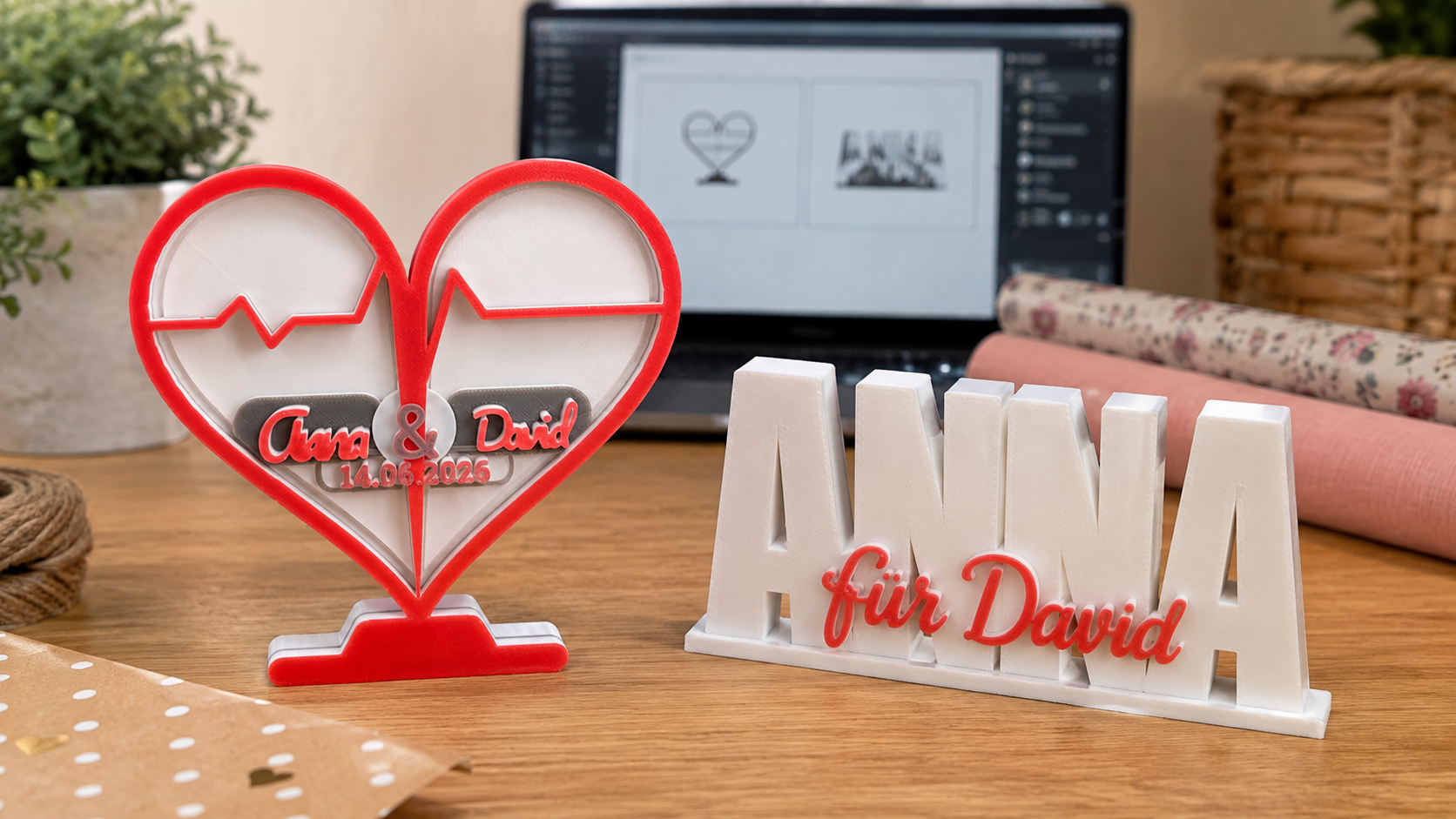
The heart combines a raised heart border, ECG or heartbeat line, name banner, optional date and integrated stand. It works especially well as a personalized wedding gift, engagement present, anniversary gift, Valentine’s gift or keepsake for a meaningful shared date.
In Name or Names, you can enter one name, a couple’s names, a family name or a short phrase. If you enter “Anna & David”, the model automatically separates the two names at the ampersand. Date or Short Text can contain a wedding date, anniversary or brief message, and can also be left empty.
Six decorative name fonts are available: Pacifico, Chopin Script, Dancing Script, Great Vibes, Lobster and Z003. They do not behave identically with every word. Short names often suit a flowing script, while longer names are usually clearer in a more compact, heavier option.
Heart Width controls the overall width while the other elements scale proportionally. Total Depth changes the complete depth of the background and raised details. Before ordering, check both the displayed overall dimensions and the available shelf or table space.
Create a personalized heart online
Enter the names and date, compare six fonts, adjust the width and depth, and inspect the generated model in 3D.
2. Personalized 3D name sign with two font styles
The second model deliberately uses two typographic levels. A large, bold main word creates the body and stable base. A smaller decorative script sits in front of it. This gives the sign more character than a single line of standard block lettering.
Main Text is best for a short first name, family name, company name or single strong word. Its curated fonts are Anton, Archivo Black, Roboto Slab, Black Ops One and Bungee. Decorative Secondary Text can add a first name, role, date, profession, department, occasion or short greeting. Its script options include Pacifico, Lobster, Kaushan Script, Dancing Script and Yellowtail.
Some practical combinations are:
- Main text “ANNA” with secondary text “for David” as a personal gift.
- A wedding surname with the ceremony date for a reception table.
- A first name with “Favourite Person” for a shelf or desk.
- A business name with a department or role for a reception desk.
- A child’s name with a birth date for nursery decor.
Main Text Size changes the visible letter height. Longer words become wider, so the overall width deserves as much attention as the height. Sign Depth controls the depth of the main body and base. A deeper model may stand more securely, but it also uses more material and takes longer to print.
Design a dual-font name sign
Combine bold main text with a decorative script, choose both fonts, set the size and depth, and check the live 3D preview.
How the browser personalization works
- Choose the model: Decide whether the occasion suits an ECG heart or a typographic freestanding sign.
- Enter the text: Type names, date and secondary wording carefully. Capitalization and spaces are part of the design.
- Compare fonts: Choose for appearance and printability. Fine strokes need enough physical thickness.
- Set the dimensions: Consider the intended location and review the displayed overall size.
- Update the preview: Rotate the model and inspect letter connections, small details and the base.
- Choose the output: Download the STL or continue to the finished-print order.
Should you download the STL or order a 3D print?
Download the STL for your own printer
The STL option is useful if you own a 3D printer and want full control over filament, color, layer height and slicer settings. You can open the generated file in a common slicer and choose orientation, scale, wall count, infill and print speed for your machine.
Always inspect the file in the slicer before printing. Confirm that the complete base sits correctly on the build plate, fine scripts remain printable at your nozzle and line width, and any planned color change occurs at the intended layer. A small test print can save time when a design contains delicate script lettering.
Order the finished 3D print
If you do not own a printer—or simply want the gift without tuning a slicer and running tests—the printed-order route is easier. Personalize the model in the browser and continue to the available production options.
This avoids dealing with bed adhesion, supports and machine profiles. You should still check spelling and the 3D preview carefully before ordering. A perfectly printed name is still wrong if the original text contains a typo.
Important: preview colors are not STL colors
Both configurators let you choose colors for the preview. This is helpful for judging contrast and imagining the finished object. A standard STL file does not normally store reliable color information; it primarily describes surface geometry.
If you print the STL yourself, the real colors come from your filament and printing workflow. A multi-color result may require a manual filament change, a multi-material system or separate parts, depending on the model and printer. Changing a preview color does not automatically create color instructions inside the STL geometry.
Which fonts work well for 3D printing?
A font can look attractive on screen yet become too fragile at a small physical size. Thin connecting strokes, tiny enclosed spaces and long flourishes are the main risks. A few practical rules help:
- Use a heavier font for smaller finished models.
- Try a calmer, more compact font for long names.
- Increase the size of delicate scripts.
- Rotate the preview and confirm that letters are genuinely connected.
- With two text layers, create a clear difference in size and style.
- Judge minimum detail together with nozzle size, line width and material.
What size should you choose?
The right size depends on more than the available shelf width. It also controls whether names, dates and fine strokes can be printed clearly. A compact name sign may suit a desk, while a heart displayed on a wedding gift table can be larger so the names remain legible from farther away.
Additional depth can improve a freestanding model’s footprint, but it increases material use and printing time. A model configured very wide and very shallow can be easier to knock over and may be more prone to warping during printing. Width, height and depth should therefore be considered together.
Common mistakes before downloading or ordering
- Failing to check the spelling of every name and date.
- Forcing a very long phrase into a delicate script font.
- Inspecting only the front and forgetting the base and overall depth.
- Assuming that preview colors are embedded in the STL.
- Scaling the downloaded STL without checking fine features afterward.
- Choosing details too thin for the selected nozzle and line width.
- Underestimating the total width produced by a long main word.
Ideas for occasions and recipients
The ECG heart is a natural fit for weddings, engagements, anniversaries, Valentine’s Day or the date a couple first met or moved in together. The dual-font sign is more flexible: it can be a birthday gift, nursery decoration, desk nameplate, family sign or small personalized present for a colleague.
A personal design rarely becomes better by adding more text. Two names and one meaningful date can say more than a whole sentence. For the name sign, a bold main name and one short handwritten addition are often enough to create a clear result.
Frequently asked questions
Do I need CAD software?
No. The supported text, font and size parameters are set directly in the browser. CAD is only necessary if you want to make structural changes beyond the options offered by the configurator.
Can I print the STL immediately?
The file is generated for 3D printing, but it should still be checked in your own slicer. Printer, nozzle, filament and slicer settings all affect the final result.
Can I order without owning a 3D printer?
Yes. After configuring the model, you can continue to the finished-print ordering route instead of downloading the STL.
Why does the same font look different with another name?
Every word has different letters, lengths, counters and connections. Always judge the font with the actual text you intend to use, not only with a sample word.
Are the selected colors stored in the STL?
No. A conventional STL contains geometry rather than dependable print-color information. The selected colors are for visualization; the physical colors depend on filament and the printing method.
Which model should I choose?
The heart is the stronger choice for a couple and a shared date. The name sign is more versatile when one name, surname, role, profession, greeting or occasion should be the main feature.
Final thoughts
Personalized 3D models do not need to be difficult or generic. Seeing your own wording, fonts and proportions on the generated object gives you more control than a simple personalization box in a shop. That is the real value of a browser configurator: you create the model without first learning CAD, then choose freely between the STL file and a finished 3D print.