

BuildYour3D vs. Cults3D ·
BuildYour3D vs. Cults3D: Key Differences for Buyers and Designers
Cults3D and Thingiverse mainly offer fixed-size STL files. BuildYour3D provides 153 parametric CAD configurators that adapt live to your exact dimensions, giving buyers and designers a fundamentally different way to create custom 3D-printable parts.
🔍 The Core Difference: Static STL File vs. Parametric 3D Configurator
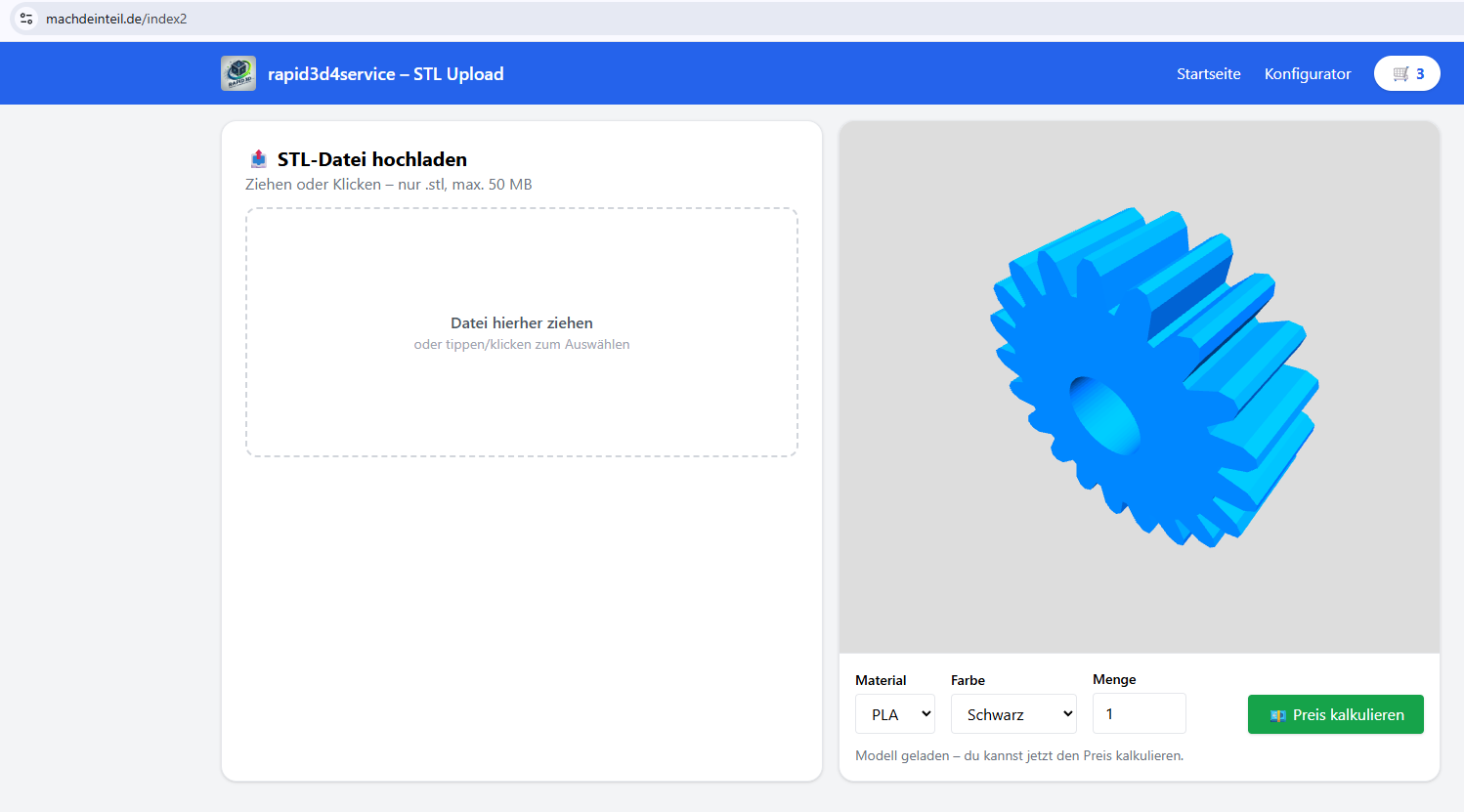
On Cults3D, Thingiverse, Printables, MakerWorld, and similar 3D model libraries, you usually download a finished STL file in the exact dimensions originally uploaded by the designer. BuildYour3D takes a different approach. None of its 153 CAD models is limited to one fixed size. Instead, each model is powered by a parametric configurator that lets you adjust dimensions, holes, wall thicknesses, shapes, and other model-specific parameters before you download or order the part.
- Choose a configurable template from a curated collection of practical replacement parts, adapters, mounts, enclosures, mechanical components, and personalized items.
- Enter your own dimensions, such as diameter, length, hole spacing, wall thickness, width, height, or other relevant parameters.
- Watch the live 3D preview update as you change the values.
- Check the customized model and then download the STL file or order the finished 3D-printed part directly.
BuildYour3D vs. Cults3D: Fixed Download or Made-to-Measure 3D Model?
Cults3D and Thingiverse are large marketplaces and communities with millions of uploaded 3D-printable files. They are useful when someone has already created exactly the model you need in exactly the correct size. In many real-world situations, however, the available design is close but not quite right. An adapter may be 2 mm too narrow, a bracket may be 5 mm too short, a hole may be in the wrong position, or the wall thickness may not suit your application.
BuildYour3D removes much of that trial-and-error process. Instead of searching through hundreds or thousands of uploads and hoping to find a perfect match, you select a parametric model and enter your own measurements. The geometry is recalculated for those values, creating a custom STL file based on your actual requirements.
This makes BuildYour3D especially useful for functional 3D printing, replacement parts, workshop solutions, repair projects, prototypes, custom adapters, machine components, and one-off parts that must fit an existing object.
For Buyers: Better Fit, Fewer Failed Prints
Anyone who regularly downloads STL files knows the problem: a model looks correct on the download page, but the printed result does not fit. The opening is too small, the mounting holes do not align, the part is too short, or the proportions are unsuitable for the intended use. Resizing the entire STL in a slicer rarely solves the problem because it changes every dimension at once, including dimensions that should remain unchanged.
With BuildYour3D, you define the important measurements before printing. The live 3D preview updates after each change, helping you verify the proportions and geometry before you download the file or place an order. This can reduce avoidable test prints, wasted filament, unnecessary print time, and repeated adjustments.
Why Uniform STL Scaling Is Often Not Enough
A standard slicer can enlarge or shrink an STL file, but uniform scaling changes the whole model. If you increase an adapter to enlarge the inner diameter, the outer diameter, wall thickness, length, and mounting features may also change. A parametric model treats these values independently. You can change the dimensions that matter while preserving the rest of the design logic.
For Designers: One Parametric Model Instead of Hundreds of Variants
Designers who publish static models face a recurring problem. Every requested size can require another file, another upload, another preview image, another description, and another version to maintain. Alternatively, users must edit the design in CAD software, which creates support questions and excludes people without CAD experience.
A parametric configurator solves this structurally. One well-designed parametric model can cover a broad range of dimensions and variants. The underlying construction logic stays consistent while users generate the specific version they need. Instead of maintaining dozens or hundreds of near-identical files, a designer can support many use cases with a single configurable model.
This approach is particularly effective for adapters, bushings, flanges, covers, pipe connectors, mounting plates, boxes, gears, profile accessories, drilling templates, brackets, and other parts defined by measurable geometry.
153 Parametric CAD Models Across 9 Practical Categories
BuildYour3D focuses on a curated library of configurable models rather than an unfiltered mass of community uploads. The current collection contains 153 parametric CAD models across 9 categories:
- Adapters: 47 configurable models
- Mounting & Profiles: 29 configurable models
- Hydraulics: 23 configurable models
- Boxes & Enclosures: 16 configurable models
- Personalization: 11 configurable models
- Gears: 13 configurable models
- Ventilation & Covers: 8 configurable models
- Drilling Plates: 4 configurable models
- Mechanics: 2 configurable models
Each item is a configurator rather than a single fixed download. The available parameters depend on the model and can include diameters, lengths, widths, heights, wall thicknesses, hole sizes, hole spacing, clearances, tooth counts, angles, and other functional dimensions.
Practical Example: Creating a Custom Adapter
A common 3D-printing use case is an adapter between two components with different dimensions. On a traditional STL platform, you search through multiple models and hope that someone has already uploaded the exact combination of both connection sizes. Even when a design looks similar, the fit may still be wrong.
With BuildYour3D, you choose a suitable adapter configurator, enter the required dimensions for both sides, define the desired length and other available parameters, and inspect the result in the live 3D preview. The final STL is generated for the dimensions you entered.
This method is useful for workshop equipment, household repairs, ventilation systems, hoses, tubes, vacuum connections, machine accessories, storage systems, furniture, electronics enclosures, and many other custom-fit applications.
BuildYour3D Compared With Cults3D, Thingiverse, Printables, and MakerWorld
| Feature | BuildYour3D | Traditional STL Libraries |
|---|---|---|
| Model type | Parametric and customizable | Usually fixed STL files |
| Enter exact dimensions | Yes, where supported by the model | Usually not available |
| Live 3D preview | Yes | Preview of the uploaded file |
| CAD knowledge required | No | Often required for structural changes |
| Independent parameter changes | Yes | Not possible with simple uniform scaling |
| STL download | Yes | Yes |
| Direct 3D-print ordering | Yes | Depends on the platform or external provider |
| Best suited for | Custom-fit functional parts | Ready-made models and community designs |
The platforms do not serve exactly the same purpose. Cults3D, Thingiverse, Printables, and MakerWorld are strong choices for browsing community creations, decorative objects, miniatures, hobby projects, and ready-made designs. BuildYour3D is designed for situations where dimensions and fit are central to the result.
A Cults3D Alternative for Custom-Fit Functional Parts
People searching for a Cults3D alternative are not always looking for another marketplace with a similar catalog. Many are looking for a faster way to obtain a model that fits a specific measurement. BuildYour3D addresses this need through customizable CAD templates rather than another collection of fixed files.
The same applies to users searching for a Thingiverse alternative, Printables alternative, MakerWorld alternative, custom STL generator, adjustable 3D model, parametric STL file, or 3D model configurator. The key advantage is not simply the number of files. It is the ability to generate a new model variant from your own dimensions without rebuilding the part in CAD software.
Customize STL Models Without CAD Software
Editing a mesh file can be difficult, especially when the required change affects functional geometry. Moving a hole, changing a thread diameter, adjusting a flange, or modifying wall thickness is not the same as scaling a decorative object. These changes often require CAD knowledge and access to the original design file.
BuildYour3D makes supported adjustments through simple input fields. You enter numbers, review the live result, and generate the customized version. No manual sketching, constraints, feature trees, or mesh editing are required.
Download the STL or Order the Finished 3D Print
After configuration, you can download the customized STL file and print it on your own 3D printer or use any printing service you prefer. You can also order the finished 3D-printed part directly. This gives makers, repair professionals, small businesses, engineers, hobbyists, and users without their own printer a flexible workflow.
The integrated process also provides immediate pricing for supported print orders, allowing you to compare the convenience of direct manufacturing with downloading and printing the model yourself.
Key Benefits at a Glance
- ✅ Enter your own dimensions instead of accepting fixed STL geometry
- ✅ Avoid searching through thousands of uploads for a lucky size match
- ✅ Preview the customized model live before download or ordering
- ✅ Change individual parameters instead of scaling the entire model
- ✅ Generate custom-fit replacement parts, adapters, mounts, and components
- ✅ Use the configurator without professional CAD knowledge
- ✅ Access 153 curated parametric models across 9 categories
- ✅ Download the STL or order the finished 3D-printed part
- ✅ View immediate pricing for direct 3D-print production
Who Is BuildYour3D Best For?
BuildYour3D is a practical option for anyone who needs a functional 3D model based on real measurements rather than a fixed design. Typical users include:
- Makers building custom workshop solutions
- Homeowners replacing unavailable plastic parts
- Repair technicians creating one-off adapters and covers
- Small businesses producing low-volume custom components
- Engineers and product developers creating rapid prototypes
- 3D-printing beginners who do not use CAD software
- Designers who want to provide many size variants from one model
- Owners of older equipment for which spare parts are difficult to source
How to Create a Custom STL File With BuildYour3D
- Browse the categories: Open the model library and select a suitable template.
- Measure the target object: Use calipers or another suitable measuring tool for accurate dimensions.
- Enter the parameters: Add the required values in the configurator.
- Check the live preview: Rotate and inspect the model before generating the file.
- Download or order: Save the STL for your own printer or order the finished part directly.
➡ Explore all customizable 3D models
Frequently Asked Questions
Are BuildYour3D models fixed like the files on Cults3D or Thingiverse?
No. BuildYour3D models are parametric. Depending on the selected model, you can change dimensions, holes, wall thicknesses, spacing, shapes, and other parameters before downloading or ordering the part.
Can I download an STL file just like on Thingiverse?
Yes. After configuring the model, you can download the customized STL file and print it yourself or use a 3D-printing provider of your choice.
Is BuildYour3D a Cults3D alternative?
Yes, particularly for users who need functional parts in custom dimensions. Cults3D focuses mainly on downloadable designs uploaded by creators, while BuildYour3D focuses on parametric templates that can be adjusted to your measurements.
Is BuildYour3D also an alternative to Thingiverse, Printables, or MakerWorld?
It can be a useful alternative when you need a custom-fit model rather than a fixed community upload. Traditional model libraries remain useful for ready-made designs, while BuildYour3D is intended for dimension-driven parts.
Can I resize an STL without CAD software?
You can scale an STL in most slicers, but that changes every dimension together. With a BuildYour3D configurator, supported dimensions can be changed independently without using CAD software.
What happens if I am unsure whether my dimensions are correct?
The live 3D preview updates as you change the values, so you can inspect the model before downloading or ordering it. For functional parts, careful measurement is still important.
Do I need CAD experience to customize a model?
No. The models are adjusted through straightforward input fields for values such as diameter, length, width, height, wall thickness, or hole spacing. You do not need to operate traditional CAD software.
How many configurable templates are available?
BuildYour3D currently offers 153 parametric CAD models in 9 categories, including adapters, hydraulics, mounting components, enclosures, gears, ventilation parts, drilling plates, mechanics, and personalized designs.
Can I order the configured part instead of printing it myself?
Yes. You can either download the generated STL or order the finished 3D-printed part directly through the platform.
What types of parts can I create?
The available configurators cover practical parts such as adapters, connectors, boxes, mounting components, profile accessories, gears, covers, drilling templates, hydraulic components, and personalized objects.
Create a Made-to-Measure Part Instead of Searching for a Lucky Match
Choose a parametric template, enter your dimensions, inspect the live 3D preview, and generate a custom STL file designed around your requirements.
Nächster Schritt